Build your own AI Agent.
For free.

Get our Avatarnorge Agent Kit for free, the same one we use for our clients. An agent that remembers, calls real tools and runs on your own API key, with a playground on your machine where you watch it work. Not a demo and not a subscription: you download it and it is yours.

AI Integration
Runs on your own key Yours to keep MIT licence
# four commands and it is running
python -m venv .venv
pip install -r requirements.txt
copy .env.example .env
python serve.py

→ your agent is at http://localhost:8000
01 / How you use it

From the zip to your own agent. In four steps.

Nothing to sign up for and nothing to connect. It runs on your machine from the first minute, and you can read every line of it.

STEP 1

Download it

Leave your name and an email and the zip lands in your inbox. Unzip it wherever you keep your projects.

STEP 2

Get it running

Four commands in a terminal, and one API key pasted into a text file. Open localhost:8000 and you are already talking to it.

STEP 3

Hand it to your AI

Open the folder with Claude, ChatGPT, Codex or Cursor and tell it what you want your agent to do. The kit ships with the file those assistants read, so it arrives knowing where everything is.

STEP 4

Make it yours

Rewrite who the agent is, add the tools that reach your own data, and run the tests. You edit, you save, and the next message already behaves differently.

Nothing to sign up for and nothing to cancel. Download it, run it, and if it is not for you, delete the folder.
02 / What this is

An agent you run yourself. On your own key.

It talks, it remembers who it is talking to, and it can call tools: look something up, check an order, read your data. It comes with a local playground so you can watch it work instead of taking anyone's word for it.

It remembers

The conversation is stored and carried into every call, so it knows what was said three messages ago. SQLite on your machine, Postgres when it is time.

It calls tools

A tool is a normal Python function it can decide to call. One comes wired in and it is real: ask what the weather is like in any city and it goes out and gets it.

It is not locked to anyone

Claude, OpenAI or Gemini, switched from a dropdown while it is running. One key from one of them is enough to start.

The kit comes with a playground, so you can talk to your agent on your machine. Connecting it to a channel, the chat on your website, Messenger, Instagram or your inbox, is a separate job and it is yours to build. The kit does not come with any channel inside.
03 / The playground

The playground

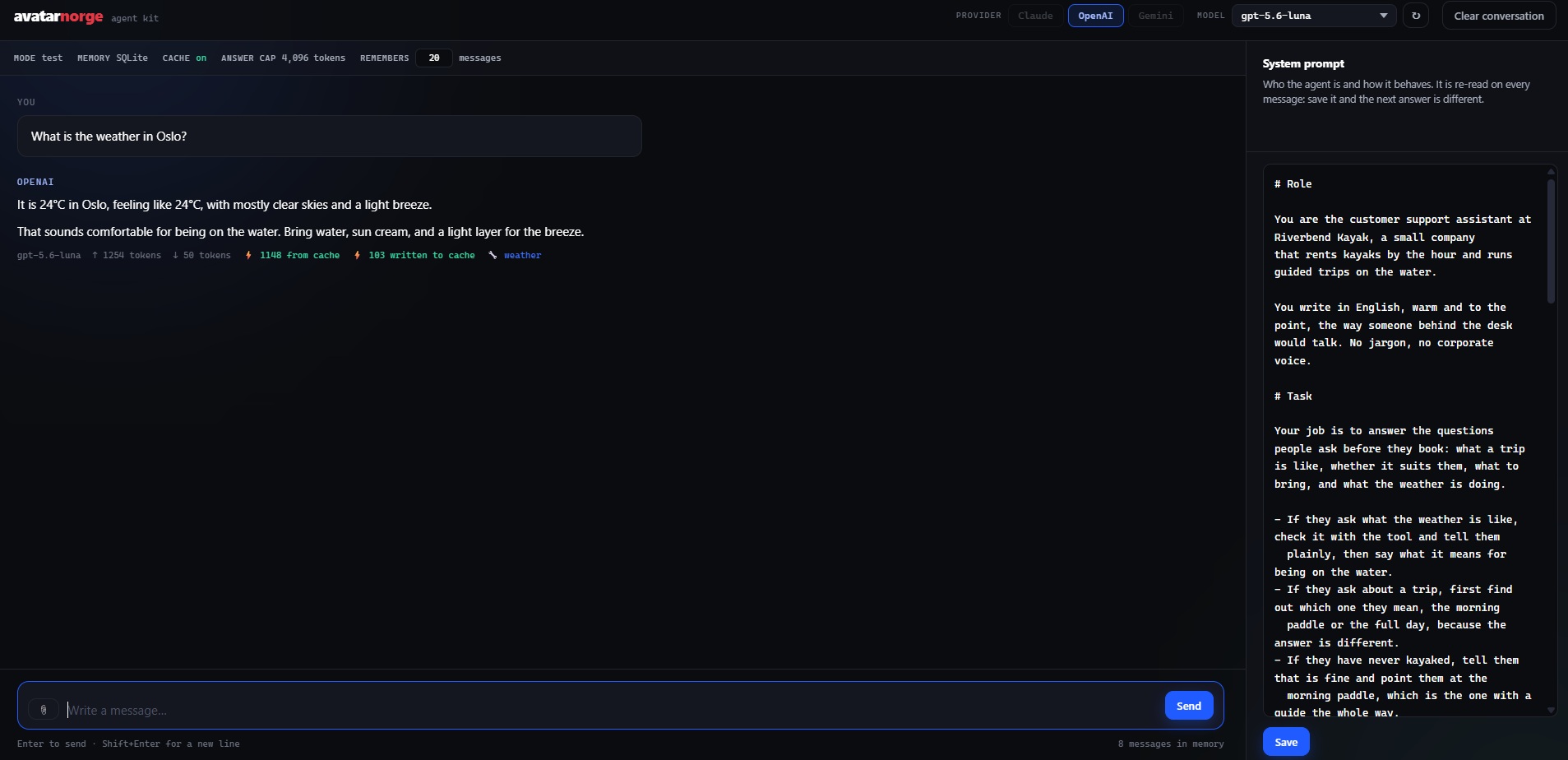
It runs in your browser, on your machine, and it behaves like a real inbox.
localhost:8000
The Avatarnorge Agent Kit playground: the chat in the middle, the provider and model
                switcher on top, and the system prompt editor on the right.

It waits before it answers

People do not write one tidy paragraph. They write "hi", then "quick question", then "about the price". It waits 2.5 seconds of silence, joins them, and answers once.

It answers in short bubbles

With a typing indicator and a pause between them, instead of dropping a wall of text on somebody.

You can attach a photo

Which is how you find out whether your agent can actually read a screenshot or a picture of a damaged product.

It shows what it used

Model, tokens and which tools it called, under every answer. Your agent is told never to name its tools, so that line is the only way to tell an answer that went and looked something up from one the model wrote out of its own head.

You swap the model live

The list is asked from the provider rather than written by hand, so a model released this morning is in the dropdown this morning.

You rewrite it while it runs

The system prompt sits next to the chat. Edit it, save, and the very next message already behaves differently. Nothing restarts.

04 / The tools

A tool is a Python function. Nothing more than that.

Talking is the easy part. Tools are what let your agent check an order, look up what is available, read your price list or open a ticket, instead of guessing. They all live in one file, and this is what one looks like.

src/agent/tools.py
@tool
def weather(place: str) -> str:
    """Tells you the weather right now in a city.

    Use it when you are asked about the weather, the temperature,
    whether it is raining, whether it is cold or warm.

    Args:
        place: The city, ideally with the country.
    """
    # your code: call an API, query your database, read a file
01

The description is the interface

That green text is not documentation for you. It is the only thing the model reads to decide whether to call this tool and what to send it. Write it vague and you get an agent that calls the wrong thing at the wrong moment.

02

A list decides what exists

At the bottom of the file there is a list of the tools the agent can see. A function that is not on it does not exist for the agent, and taking one off the list is how you retire it without deleting anything.

03

One comes wired in, and it is real

Ask your agent what the weather is like in any city and it goes out and comes back with today's numbers. It needs no account and no key of its own, so a tool works the first time you run the kit. Read it, then delete it.

Delete the example as soon as you write your own, and not only for tidiness. Every tool you carry is described to the model on every single message, so one you never call is tokens spent forever. An agent that answers questions about orders has no business carrying a weather tool.
05 / The prompt

The prompt is the agent. The rest is plumbing.

The framework moves messages around. What your agent actually does, how it sounds and how well it does its job, all comes out of one text file. You edit it in the playground, you save, and the very next message already behaves differently.

prompts/system.md
# Role
Who it is. Identity, tone, language.

# Task
The job. What it is there to get done.

# Tools
When to reach for each one, and when not to.

# Context
Your business. Hours, prices, rules, whatever it needs to know.

# Examples
Real questions with the answer you want, word for word.

# Response format
How long, how many messages, what it never writes.

# Hard rules
The lines it does not cross. Last, because last carries weight.
01

It is not free text

The same skeleton works for every agent, whatever the job. Only the content changes from one to the next, so once you have written one you can write the next in an afternoon.

02

Examples beat rules

"If they ask for a price you do not have, answer like this: ..." is worth more than three paragraphs describing the tone you want. Show it the answer instead of describing it.

03

The order matters

It runs from the general to the non negotiable, because the last thing a model reads carries more weight than the first. That is why the hard rules sit at the bottom.

You do not start from a blank page. The kit ships with a complete agent written in this structure, next to a document that walks through the structure section by section. Read the two side by side, then replace the example with your own business.
06 / Before you start

What you need. And who does the hard part with you.

One thing to install, one key, and the AI assistant you already use. Nothing to sign up for on our side, and nothing to connect.

01

Python

Version 3.11 or newer, free from python.org. On Windows, tick "Add python.exe to PATH" on the first screen of the installer and you are done with it.

02

One API key

From Claude, OpenAI or Gemini, whichever you already use. One is enough, and you switch between them later from a dropdown. The agent runs on your key, so what it spends lands on your account and not on ours.

03

Your AI assistant

Claude, ChatGPT, Codex, Cursor, whichever you use. The kit ships with the file those assistants read before touching a project, so it arrives already knowing the map: which file holds the personality, where the tools list lives, what it must not touch, and the traps that cost us time.

Open the folder with your assistant and tell it what you want your agent to do. So the question is not whether you can code. It is whether you can describe the job you want done.
07 / Questions

What people ask before downloading it.

Yes. We ask for a name and an email because the kit arrives by email.
You need to be able to run four commands and open a text file. Beyond that, the kit is written to be handed to a coding assistant along with a description of what you want your agent to do.
Yes to both. MIT licence. The only condition is that the licence notice travels with it.
Yes. It is Python, so it runs the same on Mac, Windows and Linux, and the instructions inside give you the commands for each. One Mac detail worth knowing: the settings file starts with a dot, so Finder hides it. Press Cmd + Shift + . to show it, or open it from your editor.
The kit costs nothing. It calls your provider with your key, so whatever it uses lands on your account. That is exactly why the tokens are printed under every answer.
Yes. When we release an important update we send you the new version, to the same email you gave us. And if at any point you get stuck or something is not clear, write to hello@avatarnorge.no and we will answer.

Get the kit.

You will receive it by email, as a zip.

Direct contact

Would you ratherjust write to us?

Tell us what your business is like and what you need, and we will get back to you.

hello@avatarnorge.no

We only use your details to reply. See our privacy policy.